
Map Scraper Pro is built for high-performance, localized lead generation. Extract verified phone numbers, corporate emails, and social media links directly from map listings. It fully supports unified extraction across all four major map networks: Google Maps, Apple Maps, Bing Maps, and Yandex Maps.
Runs entirely locally within your browser extension context, ensuring 100% data privacy and security compliance.
Bypasses heavy front-end layout trackers to query mapping resources directly at maximum localized speed.
Unified query profiles automate searches across Google, Apple, Bing, and Yandex Maps with zero separate API configurations.
Runs background scraping on linked business websites to extract contact emails and active social network channels.
Map Scraper Pro can be installed through three different channels. Choose the source that matches your mapping coverage requirements:

Download from your Profile and install manually to get unrestricted access.

Install with one-click direct updates directly through Google's official extension store.

Install directly from Microsoft's developer ecosystem for Edge browser native updates.
Follow these simple steps to load the full extension zip downloaded from your profile dashboard:
Open chrome://extensions in your Chrome browser and toggle the 'Developer Mode' switch in the top-right corner to ON.
Simply drag & drop the downloaded ZIP file onto the extensions page, OR click 'Load unpacked' at the top-left and select the extracted folder.
Map Scraper Pro provides unified extraction capabilities across the four major mapping networks. Run searches on any of these services to initiate scraping:
Extract global business directories. Supports comprehensive business verification status, review counts, average ratings, localized search queries, and CID reference fields.

Target high-value urban demographics. Excellent for obtaining precise coordinates, local city-center listings, and iOS-native local business presence.
Harvest B2B leads from Microsoft's business database. Perfect for identifying offices, services, and local establishments native to the Windows enterprise portal.
Target Eastern Europe and Central Asian regions. Scrapes deep-localized stores, retail entities, and service desks operating inside the Yandex map browser.
Customize how the extension interacts with Maps and processes data to bypass scraping boundaries and optimize lead accuracy.
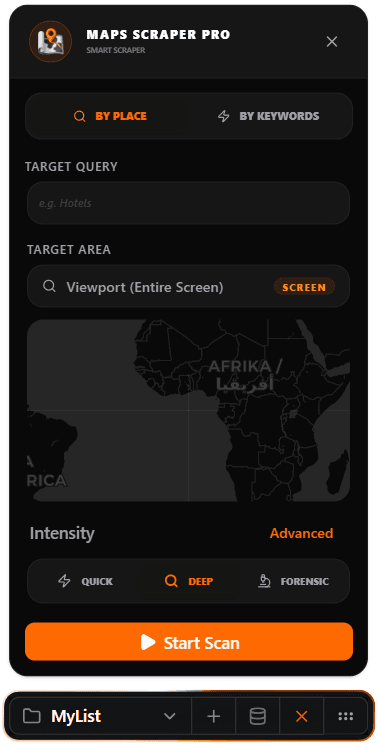
Query specific geographic boundaries using a visible Map View viewport, custom Polygon zones, or circular Radius fences (e.g. R=5km around city centers).
Input target search queries in bulk by dragging and dropping `.txt` or `.csv` keywords directories to process thousands of lists sequentially.
Select Quick mode for general scraping, Deep mode for matching emails and social profiles, or Forensic mode for maximum query depth with proxy protection.
Calibrate Zoom Levels (10-20), Tile Overlap (0-30%) to prevent missed listings, and Scroll Speeds (1-10) to bypass browser throttling policies.
Bypass non-commercial regions such as water bodies, mountains, deserts, and forests automatically, speeding up map-grid traversal by up to 60%.
Format and download your verified leads immediately in 5 clean formats: interactive HTML previews, direct Web Sheets sync, Excel, CSV, or raw JSON.
Data Sniper harvests multiple fields from every business listing. Once scraped, lists can be formatted and downloaded in one click.
Data Sniper formats and packs harvested leads into structured, offline-ready local files or syncs them straight to cooperative databases.
Establish an immediate real-time sync with Google Sheets. Updates live leads automatically as they are scraped from the browser tab without downloading local files.
Generates beautifully styled Excel tables with automatic column spacing, bold table headers, and pre-formatted telephone and zip code types.
Standard Comma-Separated Values spreadsheet format. Light and fully universal, ready to import immediately to Salesforce, HubSpot, or any custom email marketing engine.
Export leads as a structured list of JSON objects containing nested email, maps metadata, and business attributes. Highly recommended for developers and API automations.
Download a self-contained offline dashboard with data search and filtration tools, pagination, and direct dial buttons that can be shared securely with anyone.
Our support team is active 24/7. We can help you configure your scraper for maximum volume.
CONTACT SUPPORT